

Ever hit that F1 key in a Windows app and see a helpful window pop up? Chances are, you’ve stumbled upon a CHM file! Think of them as little digital books, bursting with info and ready to guide you through software, explain tricky tech, or even just offer a good read. This guide is your friendly introduction to CHM files – what they are, how to whip them up, how to tweak them just right, and how to tackle any little snags you might run into along the way.
So, What Is a CHM File, Anyway?
Imagine a super-organized digital scrapbook. CHM stands for “Compiled HTML Help,” which is a fancy way of saying it’s a bunch of web pages (HTML), images, and other resources bundled together in a single file. It includes a table of contents, an index, and even a search box.
To make it clearer, consider this example:
Suppose your company stores countless instructions, procedures, specifications, and checklists as .docx files across numerous folders. Navigation is a nightmare — especially during audits, when you need to find and present these documents quickly.
Then one day, you receive a sample .chm file used by another company to store all this information. It looks like a website, with a navigation tree on the side and links between pages. It’s clean, fast, and easy to use — a much better way to distribute documentation internally compared to Word files.
In simple terms: A CHM file is like a mini-website you can use offline.
Why Should You Care About CHM Files?
CHM files actually have some real advantages, the most important ones being:
- The output is a single, portable file
- No Internet connection is required
Yes, it’s an older format – but still in use today. And there are reasons why:
- Interactive features: CHM files support search, commenting, and even analytics (with additional customization).
- eBooks with a kick: More interactive than plain PDFs, thanks to clickable menus and built-in navigation.
- Tech manuals, reimagined: Easier to navigate and less frustrating than a pile of PDFs.
- Internal knowledge hubs: Ideal for internal company wikis or documentation.
- Offline browsing: Need a website on the go? A CHM file can package it up for offline viewing.
For instance, if you’re documenting a web development trick, you can include working demos (like jQuery code) directly in your CHM file.
Some older mobile apps supported CHM files (e.g., on iPod Touch), but modern iOS support is limited. Consider converting CHM to HTML or PDF for mobile use.
How to Create a CHM File: Step-by-Step Guide (It’s Easier Than You Think!)
Creating a CHM file might sound complicated, but it’s really like following a recipe. Here’s the breakdown:
Step 1: Gather Your Ingredients (Your HTML Content)
- Write your web pages: Each topic = one HTML page. Use CSS for styling consistency.
- Organize your files: Group your HTML files, images, and other assets in a single folder.
- Create links: Link pages together with relative URLs so users can easily navigate.
Step 2: Create the Project Blueprint (The .HHP File)
What’s an HHP File? It’s the master plan for your CHM file. It tells the “HTML Help Workshop” (a free tool from Microsoft – more on that in a second!) what to include, how to organize it, and all the other important details.
Creating the Blueprint: You can write this file by hand (for the brave souls out there!) or use the HTML Help Workshop to help you.
Step 3: Craft the Table of Contents (The .HHC File):
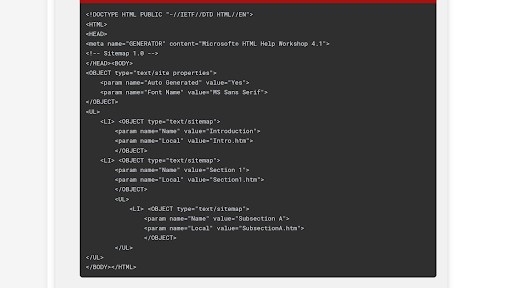
What’s an HHC File? This file is what defines the table of contents users see in the CHM file’s navigation pane. It’s like the index for your digital book.
- Create it manually with a text editor
- Or use HTML Help Workshop’s built-in interface
- It’s a structured HTML file with a nested list format
Example HHC File:
Step 4: Create the Index File ( .HHK File)
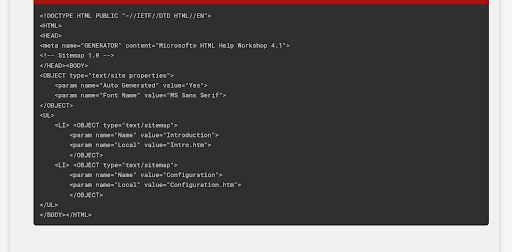
What’s an HHK File? This file defines the index that lets users quickly find specific topics by keyword.
- You can create it by hand or with HTML Help Workshop
- Uses a similar nested list structure as the TOC
Example HHK File:
Step 5: Baking Time! (Compiling the CHM File)
Use HTML Help Workshop to compile your project:
- Open your .HHP file in HTML Help Workshop.
- Click the “Compile” button (usually a green arrow).
- Choose a file name and output folder.
- Done! You’ve created a CHM file.
Editing and Customizing Your CHM File
Even after compiling, you can still make changes.
Decompiling and Recompiling
- Use a CHM decompiler to extract the contents
- Edit the HTML, images, and styles as needed
- Recompile using HTML Help Workshop
Quick Fixes (Direct Editing)
Some advanced CHM editors allow in-place editing without decompiling. Be careful — this can corrupt the file. Always back up first.
Customizing the Appearance
- Use CSS to control fonts, colors, and layout
- Use HTML templates for a consistent structure
- Use a CHM editor with a visual interface to simplify layout and content management
CHM Troubleshooting: When Things Go Wrong (And They Sometimes Do)
Sometimes, CHM files can be a little temperamental. Here’s how to handle some common issues:
“Navigation to the webpage was canceled” or “Action Canceled”:
Cause: Windows is being extra cautious and blocks CHM files from external sources.
Fixes:
- Right-click the CHM file → Properties → Click Unblock
- Move the file to a local drive (e.g., Desktop or Documents)
- (Advanced) Add the location to Trusted Sites in Internet Explorer (not recommended unless you understand the risks)
Missing Content or Broken Links:
Cause: The CHM file might be corrupted or uses incorrect paths.
Fixes:
- Recompile from the source: If you have the original files, try compiling the CHM file again.
- Check for incorrect links: Make sure all the links to other HTML files and images are correct. Use relative paths (e.g., “Topic1.htm” instead of “Topic1.htm”).
- Decompile and inspect your HTML for broken links.
Compatibility Issues:
- CHM files are Windows-only — they don’t open natively on macOS or Linux
- Fixes: Use third-party CHM viewers like xCHM, ChmSee, or convert to PDF or HTML using free tools
Security Considerations:
Opening CHM files from untrusted sources can be risky, as they could contain malicious code. Be careful when opening CHM files from unknown sources. If you didn’t create it, be wary!
Taking Your CHM Skills to the Next Level
Here are some advanced features every power user should know:
- Custom Skins: Give your CHM file a unique look and feel by applying custom-designed skins using HTML and CSS.
- Context-Sensitive Help: Make your software more user-friendly by linking specific topics in your CHM file to different parts of your application. When users press F1, they get the exact help they need—no digging required.
- Multimedia: Enhance your content with audio, video, and interactive elements. (Avoid Flash—it’s outdated and unsupported on most modern systems.)
Beyond CHM: Exploring Alternatives
- Online Help: Easy to update, accessible from anywhere
- PDF: Reliable, printable, and cross-platform
- Markdown: Lightweight and portable — easily converted to HTML or PDF
- WebHelp: Browser-based help system with rich features
- HATs (Help Authoring Tools): Advanced documentation tools with multi-format publishing
Conclusion
CHM files remain a valuable format for software documentation and internal knowledge bases. They’re compact, portable, and surprisingly powerful — even in 2025.
Knowing how to create, edit, and troubleshoot CHM files lets you take full advantage of this format, whether for personal projects or professional use. Consider modern alternatives when online access, mobile compatibility, or collaborative editing are priorities.
Good luck with your technical writing!
Author, host and deliver documentation across platforms and devices
FAQ
What software do I need to create a CHM file?
The most common tool is Microsoft HTML Help Workshop. It’s free and allows you to compile HTML, images, and other assets into a CHM file. You can also use third-party tools like HelpNDoc or FAR HTML for more advanced features.
Can I open CHM files on macOS or Linux?
CHM files are designed for Windows. However, you can open them on macOS or Linux using third-party CHM viewers such as xCHM, ChmSee, or CHMox. Alternatively, you can convert CHM files to PDF or HTML for broader compatibility.
Why does my CHM file say “Navigation to the webpage was canceled”?
This typically happens when Windows blocks the file for security reasons, especially if it was downloaded from the internet. Right-click the file, go to Properties, and click Unblock if the option appears.
Can CHM files contain malware?
Yes. CHM files can run scripts and executable code, so never open one from an unknown or untrusted source.
What’s the difference between CHM and HTML files?
HTML files are individual web pages. CHM files compile multiple HTML files, images, and other assets into a single, searchable help file with navigation, indexing, and offline access.
Are CHM files still relevant today?
While they’re an older format, CHM files are still widely used for offline software documentation, internal help systems, and legacy projects due to their simplicity and portability.