
AI bots in documentation have become controversial. Some teams report great results: “Our bot cut support tickets by a third.” Others are skeptical: “Bots are too basic, they’ll never replace a human.”
Who’s right?
Both. But the question isn’t whether bots are “smart enough.” The question is: what kinds of questions are people actually asking?
Here’s what we’ve learned from analyzing question patterns across hundreds of documentation portals with AI assistants: A significant portion of user questions—often 50-70%—are straightforward, factual queries that can be answered directly from existing documentation. The strategic question isn’t whether bots are sophisticated enough, but whether your documentation receives enough of these automatable questions to justify implementation. And the data usually shows they do.
Real story: Why a bot with limited content still cut support tickets by a third
A financial services software company was migrating their documentation online. Like many teams we see, they’d been maintaining offline PDFs for years and finally decided to move to a web-based documentation portal.
This is a common trend: companies realize that searchable, linkable online docs serve users better than downloadable files. But the migration takes time.
They decided to add an AI assistant to their new online docs—partly to modernize, partly because they’d heard mixed reviews and wanted to test it themselves.
The problem: the migration was only 60% complete. Major features were still documented in old PDFs, not yet transferred to the online portal.
The hesitation: “Should we wait until everything is online before enabling the bot? It seems pointless with so much content still missing.”
They decided to launch it anyway, figuring they’d learn what didn’t work.
Three weeks later, support tickets had dropped 31%.
Why? They analyzed three weeks of questions users asked the bot.
The discovery: 58% of questions to the bot were simple questions with clear answers in the existing documentation:
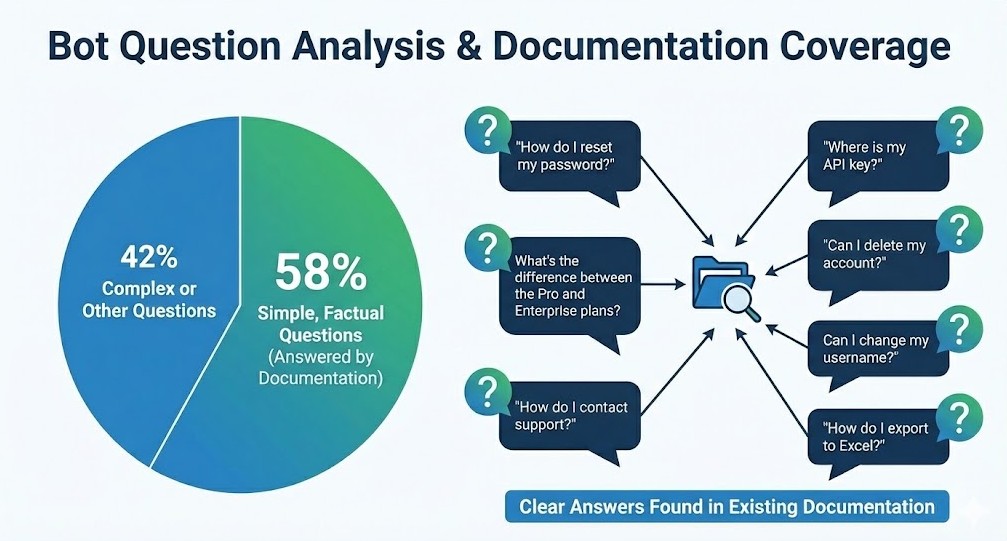
On these questions, the bot performed well—even with incomplete documentation. It found the relevant article, pulled the answer, showed the source. Users got what they needed.
The other 42% were either questions about undocumented features (bot couldn’t answer, which was expected) or complex, context-heavy questions that needed human troubleshooting anyway.
The key insight: The bot’s effectiveness wasn’t limited by incomplete documentation. It was determined by the fact that most real user questions are simple.
Important context: Not all users interact with the bot. Many go straight to emailing support—they don’t even try the docs. So a 31% reduction in support tickets represents significant relief for the team, even though it’s not half or more.
The bot wasn’t magic. It was just good enough for the simple questions—and it turned out the simple questions were the majority.
The human behavior insight: People prefer to ask than search
Here’s something we see consistently: even when the answer is on the first page of search results, many users will ask a bot instead.
Why do users prefer asking a bot over searching documentation themselves, even when the answer is readily available in search results? Here are the top 3 reasons based on behavioral analysis:
1. Lower cognitive load
It’s easier to type a question in natural language (“How do I reset my password?”) than to formulate a good search query (“password reset” vs “change password” vs “forgot password”). With a bot, you just ask—the way you’d ask a colleague.
2. Confirmation seeking
“I read the article, but I want to make sure I understood it correctly.” Even when users find the answer through search, they often ask the bot to confirm their interpretation. This is especially common for important or risky actions.
3. Honest laziness
“I know it’s in there somewhere, but I don’t feel like searching.” Users prefer the path of least resistance. If asking the bot is easier than scanning search results, they’ll ask the bot.
This isn’t a bug in human behavior—it’s a feature. And a bot addresses this need.
If you have a lot of simple, repeating questions, a bot will reduce support load even if it’s not perfect. Because it meets users where they are: wanting to ask rather than search.
How to know if a bot will help YOUR docs: The simple-question test
Before you decide whether to add a bot, run this analysis.
Step 1: Pull 30 days of questions
Sources:
- Support tickets (especially those that reference docs or ask “how to” questions)
- Docs site search queries
- If you already have a bot or chat widget, pull those logs too
Step 2: Divide questions into two types
Type A: Simple (bot-friendly)
Characteristics:
- Factual answer exists in one documentation article
- No account-specific context needed (“How do I export?” not “Why is MY export failing?”)
- No multi-step troubleshooting required
Examples:
- “How to export to Excel?”
- “Where is feature X in the UI?”
- “What’s included in the Pro plan?”
- “Can I change my username?”
- “Where do I find my API key?”
Type B: Complex (needs human)
Characteristics:
- Account-specific: “Why is MY export failing after I upgraded?”
- Multi-step troubleshooting: “I tried resetting my password, then clearing cache, still can’t log in”
- Edge cases or situations not covered in docs
- Complaints or feature requests (human empathy required)
Examples:
- “I exported but the file is empty—I already checked file size and permissions”
- “Can you help me migrate 10,000 records without downtime?”
- “Why was I charged twice this month?”
- “Your competitor offers X, why don’t you?”
Step 3: Calculate the ratio
Count how many questions fall into each type.
- If Type A ≥ 50%: A bot will provide significant value
- If Type A is 30-50%: A bot will help noticeably—worth implementing
- If Type A < 30%: The bot’s impact will be minimal—most questions need human judgment
Simple proxy if you don’t want to categorize everything: Look at how your support team resolves tickets. If >30% of tickets close with just a link to a docs article (no additional explanation needed), those are all Type A questions. A bot can handle them.
Step 4: Decide
If you have ≥ 30% Type A questions, a bot will meaningfully reduce support workload. If you have < 30%, focus on other improvements first—improving findability, structuring task-based content, and fixing core documentation issues before adding automation.
Your “FAQ-10”: The questions worth automating
Don’t try to automate everything. Start with the top 10 most frequent simple questions.
How to build your FAQ-10 list:
1. From your analysis above, take all Type A questions
2. Cluster by theme (not by exact wording):
- “reset password” / “forgot password” / “change password” → one theme
- “where is API key” / “find API token” / “get API credentials” → one theme
- “export to Excel” / “download as spreadsheet” / “save to CSV” → one theme
3. Rank by frequency
Count how many times each theme appeared in your 30-day sample.
4. Take the top 10 (or 5, or 25—depends on your volume)
These are your automation candidates.
Example FAQ-10 table:
| Theme | Example questions | Docs article | Frequency/month |
| Reset password | “forgot password”, “reset password”, “change password” | “Account Security > Reset Password” | 45 |
| API key location | “where is API key”, “find API token”, “get credentials” | “API > Authentication” | 38 |
| Plan features | “what’s in Pro”, “plan differences”, “Enterprise features” | “Plans & Pricing > Feature Comparison” | 32 |
| Export to Excel | “export Excel”, “download spreadsheet”, “save as CSV” | “Reports > Export Options” | 28 |
| Username change | “change username”, “update display name”, “rename account” | “Account Settings > Profile” | 24 |
Note on thresholds: “Frequent enough” depends on your traffic. Start with >10 occurrences per month and adjust based on your reality. The goal is to focus on high-impact areas—you can’t automate everything, and you don’t need to.
Pre-bot checklist: Ensure your docs are bot-ready
Before you launch a bot, make sure your content and infrastructure are ready.
Content quality
🔲 FAQ-10 topics have clear articles in your docs. Each theme in your FAQ-10 list has a dedicated, up-to-date article.
🔲 Answers are in the first paragraph. Don’t bury the answer halfway through the article. Bots (and users) need it up front.
🔲Use the terminology users actually say. If users say “reset password” and your article is titled “Credential Recovery Procedures,” the bot will still find it—modern AI understands synonyms. But using the user’s exact terminology makes results more precise and improves confidence in the answer.
🔲 Write for AI comprehension. Modern technical writing includes a new skill: writing clearly enough for AI to understand and correctly interpret your content.
- Ambiguous phrasing, buried answers, or overly complex sentence structures make it harder for bots to extract the right information.
- Clear structure, direct language, and explicit answers help both humans and AI.
- Best practices: Use plain language, write concisely, and structure content logically.
Monitoring in place
🔲 You can see what people ask the bot. Track: most common questions, topics where bot succeeds vs. struggles.
🔲 You can track “bot answered, but user still contacted support”. This is a key signal: the bot provided an answer, but it wasn’t helpful. Indicates either docs inaccuracy or bot misinterpretation.
Team alignment
Before launching your bot, prepare your support team for the shift. Once a bot starts handling simple, repetitive questions, your support team’s workload composition will change—they’ll see fewer “How do I reset my password?” tickets and more complex, context-heavy issues that genuinely need human judgment. This is a positive change, but it requires preparation. Brief your support team on what questions the bot will handle, how users will interact with it, and what escalation patterns to expect. When your support team understands the bot’s role, they can better handle the more nuanced questions that come their way and provide feedback on where the bot’s coverage needs improvement.
How this looks in ClickHelp
If your documentation is on ClickHelp, you have built-in tools for this.
AnswerGenius:
AnswerGenius is ClickHelp’s AI assistant that lives in your documentation. It answers user questions by searching your content and generating responses based on what it finds.
Key advantages:
- Works with your existing content—no separate FAQ database to maintain
- Considers Index Keywords (can be used for synonyms) when matching questions to articles
- Shows source articles so users can verify or read more
- Respects permissions: For password-protected content, the bot only searches and answers based on content accessible to the current user
AnswerGenius Report:
The AnswerGenius Report shows bot performance metrics and conversation logs. Here are the key metrics:
- Total Questions: How many questions users asked the bot in the selected period
- Success Rate: Percentage of questions the bot answered successfully
- Avg. queries per chat: How deep conversations typically go
- Unique users: How many different people used the bot
Plus trend charts showing how these metrics change over time (weekly or monthly).
How to use the report:
- Identify documentation gaps: Filter by “Unanswered questions” to see where the bot couldn’t provide helpful responses—often indicates missing or unclear content in your docs.
- Measure bot effectiveness: Track Success Rate trend after you update documentation. Did the rate improve?
- Monitor adoption: Are Total Questions and Unique Users growing? This shows whether people rely on the bot.
- Support release analysis: After publishing new docs, check Questions Over Time. Peaks may indicate confusing new functionality.
- Validate content improvements: After updating topics, search for related questions. Fewer unanswered queries = your improvements worked.
- Provide insights to support teams: Review last 7 days of unanswered queries so support can anticipate common problems.
Use this weekly to refine your FAQ-10 list and spot new automation candidates.
Common pitfalls when implementing a documentation bot
Based on what we see across customer implementations, here are the most common mistakes teams make when adding AI assistants to their documentation—and how to avoid them.
Mistake 1: “The bot should handle everything”
Start narrow with your FAQ-10. Don’t expand until those 10 topics work reliably. Better to handle 10 topics well than 100 poorly.
Mistake 2: Set and forget
Your product changes. Review bot performance weekly for the first month (15 minutes), then monthly. Update your FAQ-10 list as question patterns evolve.
Mistake 3: Waiting for “bot-ready” docs
Don’t wait for perfect documentation before launching. Start with your FAQ-10 topics, launch the bot, measure what works and what doesn’t, then improve content based on real usage. Perfectionism delays learning. Launch, measure, improve—that’s the cycle.
Takeaways
Why bots work:
- Modern AI bots are increasingly capable, but their practical impact comes from a different factor: the question distribution in your docs. When 50-70% of questions are factual and repeat frequently, even a moderately capable bot delivers significant value—and as bot sophistication improves, that value only increases.
- If ≥ 30% of your questions are factual and repeat frequently, a bot will noticeably reduce support load—even with incomplete documentation.
- Remember: not all users will use the bot (many email support directly), so even a 20-30% overall ticket reduction is significant.
How to start:
- Analyze 30 days of questions → split Type A vs. Type B
- Build FAQ-10 list from Type A themes
- Audit those 10 articles—answer in first paragraph, clear language
- Launch bot, monitor weekly, improve based on real usage
- Don’t wait for perfect docs. Launch with FAQ-10, measure, improve. Perfectionism delays learning.
What success looks like:
- Support tickets on FAQ-10 topics drop 20-35% in first weeks
- Bot answers > 70% of FAQ-10 questions
- Warning sign: If tickets don’t drop but you get “bot told me X but it didn’t work” complaints—investigate docs accuracy, clarity, or bot interpretation
For technical writers:
- Modern technical writing requires clarity for AI: use plain language, concise writing, and logical structure
- Monitor weekly in the first month, monthly after
- Your FAQ-10 list evolves as your product changes
The real question isn’t “Are bots useful?” It’s “What’s your question distribution?” Check your data. You’ll likely find that 30-50% or more of your questions are automatable—and that’s more than enough to justify implementation.

Good luck with your technical writing!
Author, host and deliver documentation across platforms and devices
FAQ
How do I know if my docs have enough “simple questions” for a bot to be worthwhile?
Analyze 30 days of support tickets. If >30% of tickets close with just a docs article link (no extra explanation), you have enough simple questions to make a bot worthwhile. You can also look at your docs search queries—if you see the same queries repeating frequently, those are automation candidates.
What if the bot gives wrong or unhelpful answers?
Investigate. Could be the docs (unclear or outdated content), could be how the bot interprets the content (ambiguous phrasing), or could be the bot itself. Modern technical writing means writing clearly enough for AI to understand and correctly convey information. If bots consistently struggle with your content, it’s often a signal that the writing needs to be more direct and explicit.
Should we wait until our docs are “complete” before adding a bot?
No. The case study in this article shows: even with incomplete documentation, a bot helped significantly because simple questions already had answers. Start with the FAQ-10 topics that ARE documented. You’ll discover which other topics need documentation through bot analytics.
How often should we review bot performance?
Weekly for the first month (15 minutes—quick check of top questions and any user complaints). Monthly after that, unless you see support ticket patterns changing. Also review whenever you launch a major product update or new feature.
Only some of our users interact with the bot—many still email support directly. Is it still worth it?
Yes. Even if 40-50% of users bypass the bot and email support directly, reducing the load from the other 50-60% creates noticeable relief for your support team. A 20-30% overall reduction in support tickets is significant and worthwhile, even if it’s not a majority.
Our product changes frequently—will the bot become outdated?
Yes, and so will your docs. The bot surfaces outdated or missing content faster because users will complain when answers don’t match reality. That’s actually useful—it forces you to keep docs current. Just build the weekly/monthly review into your workflow.
We don’t have ClickHelp—can we still implement this approach?
Absolutely. The FAQ-10 methodology and simple-question test work regardless of platform. If you’re evaluating AI assistant tools, look for ones that: work with your existing content, show what questions users ask, and let you track bot performance over time. The principles in this article apply to any AI documentation assistant.