Most teams do documentation review — but rarely in a consistent or structured way. Someone skims a topic for typos, someone else checks technical details “when there’s time,” and approval often happens informally in Slack or email. As a result, very different activities are all called documentation review: analyzing support tickets to decide what to write, SME comments on draft content, spell checks, or a final managerial sign-off.
This ad hoc approach works only up to a point. Over time, outdated topics remain published, factual errors slip through, and it becomes unclear who is responsible for the final version. Documentation quality depends on individual effort rather than on a predictable process.
To make documentation reliable and scalable, review needs to be broken down into clear stages, each with its own goal, checklist, and owner. In the fast-moving IT environment, publishing documentation without such a review cycle can have serious consequences. Outdated instructions or incorrect troubleshooting steps frustrate users, increase support tickets, and reduce product adoption.
This is why documentation review matters. A structured review process ensures content is accurate, relevant, and clear. By applying multiple review types, organizations reduce errors, build user trust, and lower support costs.
In this article, we focus on the main types of documentation review: topic relevance, fact accuracy, content quality, language and style, and final approval. We’ll explain why each step matters, provide practical checklists, and give real-world examples to make the process actionable.
Topic Relevance Check
The first step in reviewing IT documentation is ensuring the content reflects the current status of software, infrastructure, and development environments. Documentation must align with the latest software releases, frameworks, APIs, and security protocols. Given the rapid pace of IT, features may become deprecated, configurations updated, and compliance requirements changed.
Topic relevance review is often what teams mean when they say “we review what to document,” even though it happens before the actual writing begins.
Example: A guide for integrating a cloud service should document current API endpoints, authentication methods, and supported regions. Outdated information may lead to developer confusion, deployment errors, and increased support requests.
Checklist for topic relevance review:
- Does the documentation match the current software build, patch level, and platform ecosystem?
- Are all code snippets, configuration files, and sample commands updated to current standards?
- Are recent changes in IT governance, security policies, or infrastructure reflected?
Tech writers facilitate topic relevance review by collaborating closely with developers, product managers, and SMEs. They track release notes, changelogs, and Jira tickets to identify deprecated features or new requirements, updating documentation in sync with agile sprints and CI/CD pipelines.
Fact Accuracy Verification
Fact accuracy review focuses on verifying all technical details: code samples, configurations, metrics, and procedural steps. In software development, DevOps, and security-related documentation, accuracy is non-negotiable.
Example: API documentation listing wrong response schemas or deprecated parameters can break integrations and cause cascading system failures.
Checklist for fact accuracy review:
- Are endpoints, parameters, and response formats consistent with the live API specification?
- Have procedures been validated through unit/integration tests or dry runs?
- Are benchmarks, latencies, and capacity figures up to date from recent tests?
Fact-checking involves developers, QA engineers, and SMEs who verify technical accuracy. Technical writers then integrate these updates into documentation while maintaining clarity, consistency, and formatting. This step prevents faulty guidance from reaching users, preserving system reliability and team productivity.
Accurate documentation protects system reliability and prevents teams from acting on incorrect guidance.
Content Quality Assessment
Content quality review focuses on structure, completeness, and usability. In IT, this includes ensuring DevDocs-style hierarchies, Markdown consistency, and API-first navigation patterns aligned with tools like Swagger or Postman. Duplicate endpoints are removed, unhandled error codes addressed, and diagrams or code examples embedded to mirror real-world debugging.
Checklist for content quality review:
- Does navigation mirror GitHub wiki patterns or project-specific conventions?
- Are code blocks executable in development environments with proper syntax highlighting?
- Are common use cases explained clearly, including edge cases and idempotency guarantees?
- Is the documentation comprehensive, avoiding missing steps or overlooked errors?
Tech writers collaborate with developers, product owners, and UX teams to shape both structure and visuals, synthesizing technical inputs into polished, actionable documentation. High-quality documentation reduces support queries and accelerates CI/CD workflows.
Language and Style Review
Clear, professional language ensures documentation is usable by diverse audiences, from developers to sysadmins. Tech writers refine grammar, punctuation, terminology, and tone while minimizing jargon or explaining it clearly. Tone is adapted to context: formal for compliance documents, approachable for tutorials or API guides.
Checklist for language and style review:
- Grammar, sentence structure, and punctuation are correct and consistent.
- Terminology aligns with product vocabularies and industry standards.
- Explanations are concise and free from redundancy.
- Accessibility considerations are applied, including plain language for non-native English readers.
Example: Ambiguous wording in a cloud deployment guide could cause misconfigured resources, downtime, or cost overruns. Language review mitigates these risks, ensuring documentation is both accurate and readable across multiple languages.
Final Approval
Final approval confirms documentation is production-ready. Product managers, release engineers, compliance officers, and security teams validate that all issues are resolved, regulatory standards met (e.g., GDPR, SOC 2), and content integrates into deployment pipelines.
Checklist for final approval:
- Are all review comments from Jira, GitHub PRs, or Notion addressed?
- Is versioning semantic (e.g., v2.3.1) with an associated changelog and rollback plan?
- Does the publishing workflow include internal wikis, customer portals, and integrations like ReadMe?
This step signals readiness for publication, ensuring documentation supports enterprise operations and builds trust with users.
Documentation Review Process in ClickHelp
The challenge for many teams is not whether to review documentation, but how to manage reviews consistently. In practice, reviews are often spread across Google Docs, Git pull requests, emails, and chat messages. Each tool supports only part of the process, making ownership and status tracking difficult.
ClickHelp provides a structured workflow to streamline collaboration between contributors (writers and reviewers):
- Writers create and revise content.
- Reviewers vet content for quality before publication.
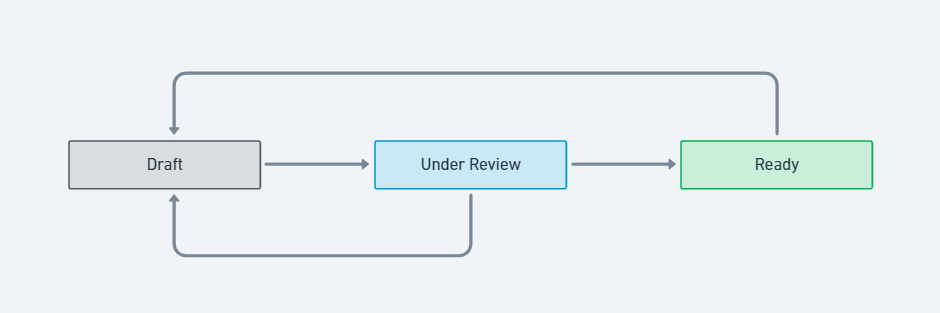
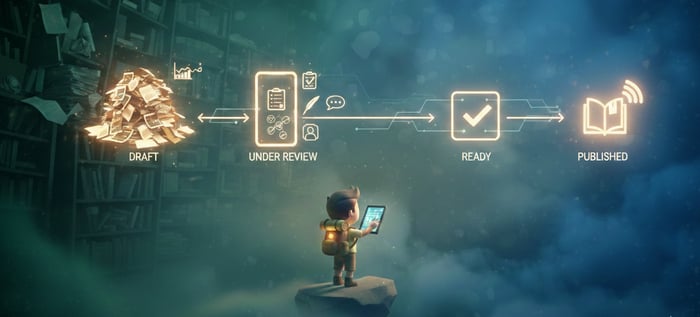
The workflow begins with a contributor creating a topic in Draft status, remaining both the owner and assignee. After writing and preliminary edits, the contributor by setting the status to Under Review and changing the assignee.
Reviewers are notified by email and can access their assignments through the Reviewer Workspace. After reviewing, the reviewer either sets the topic to Ready if it meets quality standards or returns it to Draft for further edits. The contributor is notified of any status changes or reassignments. This iterative cycle repeats until the topic is fully ready for publication.
This workflow supports multiple review iterations while keeping responsibility, status, and progress transparent.

Conclusion
When documentation review is informal, quality depends on individual effort and luck. By breaking review into clear stages—topic relevance, fact accuracy, content quality, language and style, and final approval—teams can move from “someone looked at it” to a predictable, auditable process.
With defined roles, checklists, and a supporting workflow, documentation review becomes repeatable, scalable, and effective. Tools like ClickHelp help teams bring structure to existing review practices without slowing down delivery, ensuring documentation remains accurate, usable, and trustworthy.
Good luck with your technical writing!
Author, host and deliver documentation across platforms and devices
FAQ
Why is a documentation review process important?
Reviewing documentation ensures accuracy, relevance, clarity, and usability. Without review, outdated or incorrect instructions can frustrate users, increase support tickets, and reduce trust in your product.
How does ClickHelp support the review workflow?
ClickHelp allows authors to assign topics to reviewers, track progress via the Reviewer Dashboard, and manage statuses (Draft, Under Review, Ready) until content is publication-ready. Notifications alert users of status changes or reassignment.
Are published topics available for review?
No. Topics that are already publicly published are not visible on the Reviewer Dashboard, so it’s recommended to complete all reviews before public release.
How can checklists help in the review process?
Checklists provide a structured, repeatable way to ensure each review type is covered. They help teams catch errors, maintain consistency, and reduce the risk of missing critical steps.