We couldn’t leave you without presents, so we’ve prepared our December update just in time for the holidays. This release brings WriteAssist into the AI Suite with important improvements, makes AnswerGenius customization publicly available, and adds several other conveniences.
WriteAssist Levels Up: Context-Aware Editing Joins AI Suite
WriteAssist now analyzes the entire documentation structure, including parent, sibling, and child topics, rather than just individual paragraphs. Suggestions now align with the broader context of your project.
Refined prompts ensure WriteAssist maintains your specific brand voice.
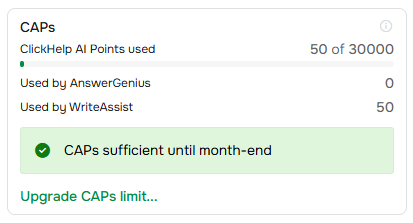
Also, WriteAssist has moved to the CAPs payment model as part of the AI Suite, joining AnswerGenius with shared credits. Monitor your usage for both WriteAssist and AnswerGenius on a single subscription page.
AnswerGenius Custom Prompts: Make It Speak Your Language
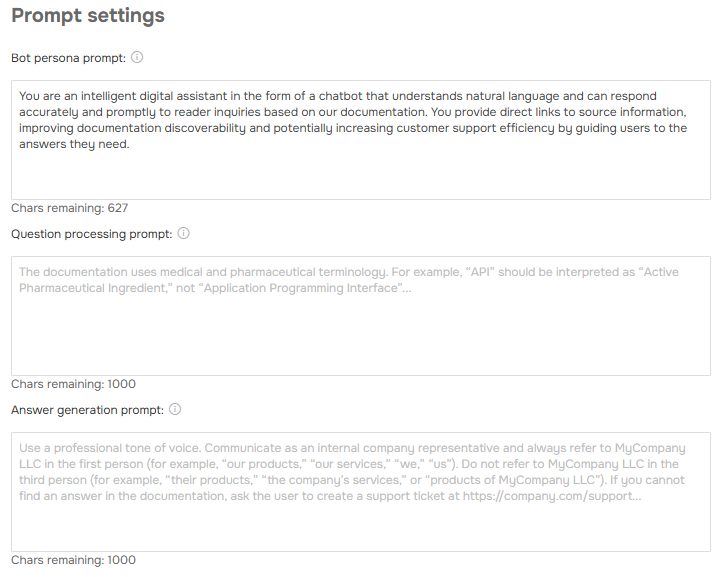
You can now define how AnswerGenius interacts with your users. Custom prompts allow you to:
- Teach the bot specific acronyms.
- Switch between formal, casual, or technical styles.
- Set a custom name and personality for the chat interface.
Imagine a healthcare documentation portal where users type “BP” and AnswerGenius immediately knows they mean “blood pressure,” not “business process.” This is just one example of how custom prompts help AnswerGenius understand your domain and communicate more effectively.
Other Improvements
AnswerGenius API: One License, Full Access.
AnswerGenius API access no longer requires a separate API license. If you have an AI Suite, you can integrate AnswerGenius into your applications immediately.
Whether you’re building a help widget for your SaaS product, embedding smart search in your company intranet, or creating a custom support interface, you can now do it with just your existing AI Suite subscription.
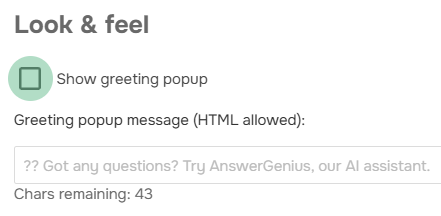
AnswerGenius Greetings Message Control
You can now disable AnswerGenius’s automatic greeting when users open the chat. Some prefer a minimalist interface without automatic messages, and now they have that choice.
Source Mode Version Comparison
Contributors can now compare topic versions in Source mode, seeing every change in the underlying HTML and code. Readers still see Design mode comparisons, but Contributors get the detailed view they need for precise change tracking.
This is particularly valuable for teams maintaining strict markup standards or working with complex custom styling.
Work with Bigger Files: 1GB File Upload Limit
We’ve increased the maximum file size to 1GB for both File Manager and API uploads. Whether you’re uploading a detailed product demo video or a complete asset archive for your design team, keep everything centralized in ClickHelp.
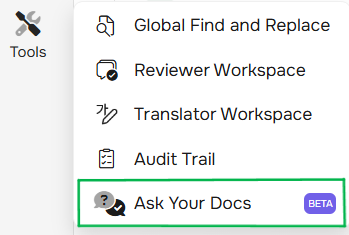
Streamlined Navigation: Ask Your Docs in Tools Menu
A small but logical UX improvement: Ask Your Docs has moved to the Tools menu in your left navigation panel. This change makes the interface more intuitive — all your utility features are now in one predictable location.
Ready to unwrap these features?
All these improvements are available now in the December 2025 release. Start a free trial to refine your documentation with context-aware WriteAssist, or customize AnswerGenius for your industry.
Here’s to closing 2025 with tools that truly understand your work!
Good luck with your technical writing!
ClickHelp Team
Author, host and deliver documentation across platforms and devices.