
The latest ClickHelp release focuses on practical improvements:
- Link behavior: Share links directly from the address bar, and readers will be taken to the right version of the content they have access to.
- API: Import docs from multiple formats, upload large files, and delete projects and publications.
- Secure user management: Automatically disable inactive users to keep your workspace compliant.
Let’s take a look at what’s new!
Universal Links: Share Once, Work Everywhere
We’re introducing Universal Links — an upgrade to how URLs behave in ClickHelp. Now, any link to a topic, project, or publication in ClickHelp is smart.
- Copy a project-level URL, share it, and the reader will open the matching topic in the appropriate publication — automatically.
- Readers always see the most relevant version of the content they have access to.
- Works similarly to Smart Links but now applies by default to all links to project or publication topics when a reader does not have access to the target document. When this happens, the system will look for a version of the same topic among other publications of the project to redirect the reader there.
Why It Matters
- Consistency: One URL works for everyone, in any role.
- Stronger user experience: Сlients always land on content they can access.
- Fewer support tickets: Readers always reach the correct version of a topic, as Universal Links automatically deliver the most current and accessible version for each reader. They remove the need to verify or curate links manually.
When I’m chatting with a client, I just copy the URL from my address bar and send it, without second-guessing if it will work for them.
API Upgrades: Bigger Files, Better Import, and More Control
We’ve significantly expanded ClickHelp’s API capabilities. For teams already using ClickHelp’s API, we’ve made importing documentation easier than ever: upload large files, import in multiple formats, and manage the lifecycle of projects and publications—all without manual work.
The Storage API now supports direct binary uploads for large files. You can upload files via API using the new binary format, including the new chunked upload mode. Smaller files can still be uploaded using the traditional single-request Base64 method.
We’ve expanded content import via API. In addition to OpenAPI, the API now supports import from other formats:
- Word,
- HTML,
- Markdown,
- RTF,
- EPUB,
- ODT,
- ClickHelp Project Backup,
- docfx.
Teams gain the flexibility to automate work with multiple sources and formats via the API.
We’ve also added the ability to delete projects and publications via API. This is especially useful for teams automating content management who want to keep their portals up to date without extra clicks. Outdated projects and publications can now be removed programmatically.
New to ClickHelp API? Try it and automate content workflows. With our API, you can manage projects, publications, users, storage, search, topics, and more — all programmatically.
Security: Auto-Disable Inactive Accounts
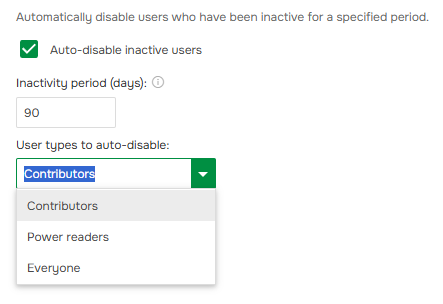
For companies with high security requirements, we’ve enhanced the Enterprise Security add-on. You can now configure automatic disabling of accounts that haven’t been used for a set period (e.g. 90 days), also select which user roles to include or exclude, and let the system handle the rest.
Why It Matters:
- Ensure compliance with corporate security policies
- Reduce the risk of unauthorized access from dormant accounts
- Save administrator time on manual user management
- Minimize unnecessary license usage
What You Get With This Update
Every improvement in this release was driven by real customer needs:
- Universal Links ensure that links copied directly from the browser address bar, no matter whether you’re looking at a project or a publication, always open the correct content for the reader, minding their permissions and access;
- Expanded API gives you more control for automated content management in your documentation pipelines;
- Automatic disabling of inactive accounts now simplifies user management at scale, ensuring that non-active users are maintained without manual intervention.

Good luck with your technical writing!
Author, host and deliver documentation across platforms and devices.